

McDonald’s Free WiFi: How to Connect, Login & Troubleshoot
Yes, McDonald’s may offer free WiFi at participating Canadian restaurants. Open your phone, tablet, or laptop’s WiFi settings, choose the restaurant’s guest network, open a browser, and accept any displayed terms. A password is often unnecessary, although the connection screen and network name can differ. WiFi availability can vary by restaurant location and temporary service conditions across Canada each day.
Information checked: July 2026
McDsMenu.ca is an independent informational website and is not affiliated with McDonald’s Canada.
Does McDonald’s Have Free WiFi?
McDonald’s Canada says some restaurants may provide free public WiFi at participating locations. Do not assume every dining room has internet.
Use the official McDonald’s Canada restaurant locator, enter your city or postal code, and select Wi-fi under the available service filters. You can also open a restaurant page or call the location directly. Check its McDonald’s opening hours before visiting.
How to Connect to McDonald’s Free WiFi
- Open your device’s WiFi settings.
- Turn WiFi on and wait for nearby networks.
- Select the McDonald’s or guest network shown for that restaurant.
- Wait for your device to connect.
- Open a browser if the login page does not appear automatically.
- Accept the terms or tap the displayed connection button.
- Open a new webpage to test the connection.
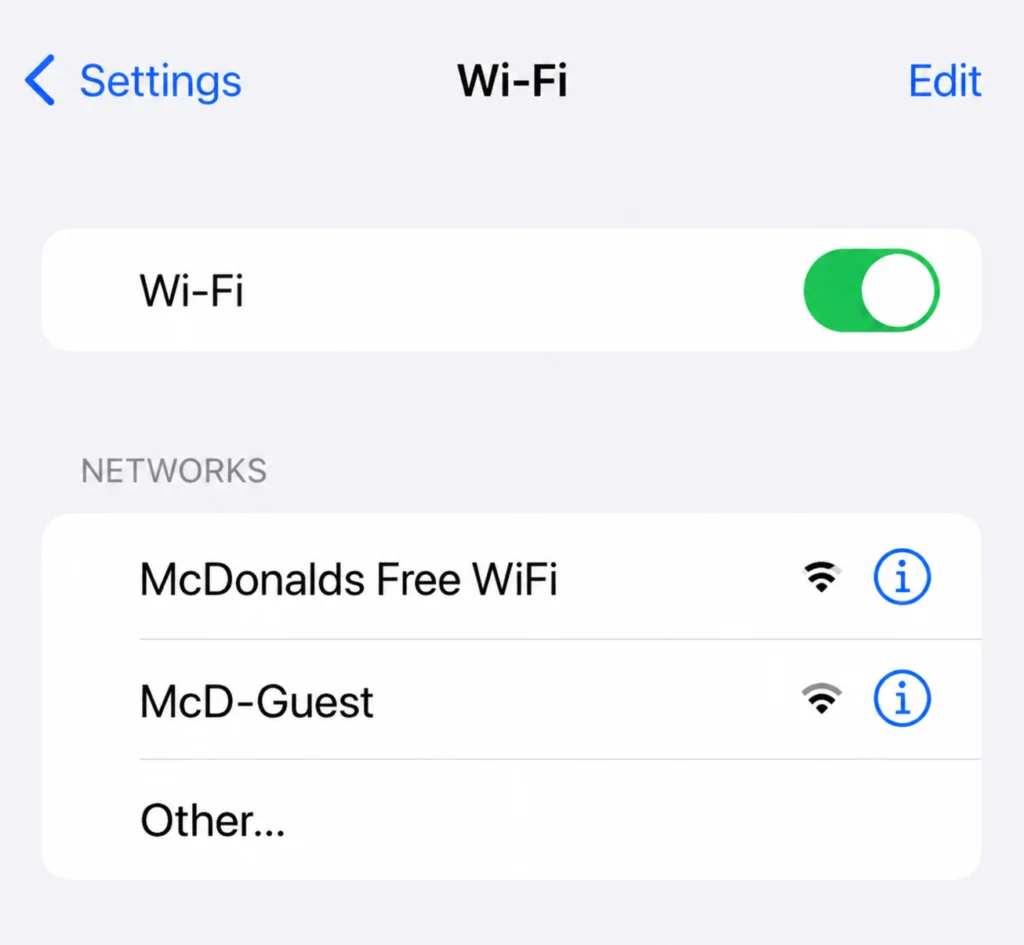
On an iPhone, use Settings > Wi-Fi. On an Android phone, use Settings > Network & internet > Internet, although labels vary by device. On a Windows laptop, select the network icon, choose the guest network, and select Connect. Ask staff to confirm the network name if needed.
Does McDonald’s WiFi Require a Password?
Usually, McDonald’s guest WiFi uses a browser terms page instead of a shared password. The browser page is sometimes called a captive portal.
Setups can vary between Canadian restaurants. Ask an employee if the network displays a lock symbol, requests an unposted password, or has a name you cannot verify. Do not enter personal information into a suspicious login page.
McDonald’s WiFi Login Problems and Fixes
| Problem | Solution |
|---|---|
| Network not appearing | Move into the dining area, refresh the network list, toggle WiFi, or confirm availability with staff. |
| Connected but no internet | Forget the network, reconnect, and complete the login page again. |
| Login page not opening | Open a basic webpage or temporarily pause mobile data. |
| Slow connection | Move closer, stop downloads, or try outside busy periods. |
| Device disconnects | Forget and rejoin the network or restart your device. |
| Browser issue | Try another browser or reopen the login page. |
| VPN blocks login | Pause the VPN to load the portal, then reconnect it. |
| Too many users | Wait, use mobile data, or try another participating restaurant. |
Confirm the network name with restaurant staff before entering personal information.
How Fast Is McDonald’s WiFi?
There is no standard Canada-wide McDonald’s WiFi speed. Performance depends on signal strength, restaurant equipment, customer traffic, the internet connection, and the number of connected devices.
The connection may support email, web browsing, messaging, social media, documents, and some online classes. Video calls, high-resolution streaming, cloud backups, software downloads, and large file transfers may be slower or unreliable.
Can You Work or Study at McDonald’s Using WiFi?
Yes, you can work or study where guest WiFi and dining-room seating are available. Use headphones, keep calls quiet, watch your belongings, and avoid occupying a large table during busy periods.
Check local McDonald’s hours in Canada and consider purchasing food or a drink. You can review the McDonald’s breakfast menu or available Canadian McDonald’s coupons before visiting. Seating and customer-use policies vary by restaurant.
Is McDonald’s WiFi Safe?
Treat McDonald’s guest WiFi like any public network. McDonald’s Canada says in-store WiFi may receive device, connection, bandwidth, location, and browsing-related information. Its privacy policy also says customers should not expect the same privacy they would have on a private network.
Avoid banking, tax, medical, or confidential work when possible. Use HTTPS websites, update your device, enable multi-factor authentication, and never share passwords.
A trusted VPN can help protect traffic on an untrusted network, although you may need to pause it briefly to open the WiFi login portal. The Canadian Centre for Cyber Security recommends avoiding sensitive information on public WiFi and using a VPN when appropriate.
McDonald’s Canada Free WiFi: What Customers Should Know
WiFi availability can vary by restaurant location. Check the official locator and call when internet access is important because outages, equipment changes, and dining-room restrictions can occur.
While connected, you can compare the McDonald’s menu and prices in Canada or use the McDonald’s nutrition calculator before ordering.
Frequently Asked Questions
Does McDonald’s have free WiFi?
Yes, some participating McDonald’s restaurants in Canada provide free public WiFi. Availability is not guaranteed, and service may be temporarily unavailable. Check the official restaurant locator for listed services or call the specific location before visiting. WiFi availability can vary by restaurant location.
How do I connect to McDonald’s WiFi?
Open your device’s WiFi settings, select the confirmed McDonald’s guest network, and wait for it to connect. Open a browser if the login page does not appear, accept any displayed terms, and select the connection button. Ask staff to verify the network name when necessary.
Does McDonald’s WiFi need a password?
Usually, guest WiFi relies on a browser login or terms page rather than a shared password. Arrangements can differ among Canadian restaurants. If your device requests a password, check signs in the dining area or ask an employee instead of entering unverified credentials.
Why is my McDonald’s WiFi not working?
The restaurant may not offer WiFi, the service may be down, or your device may not have completed the login page. Forget the network, reconnect, open a browser, pause a VPN temporarily, and move closer to the dining area. Ask staff about a possible outage.
Can I use McDonald’s WiFi without buying food?
A purchase requirement is not a universal Canada-wide rule, but individual restaurants control their seating and customer-use policies. Ask staff when uncertain, especially during busy periods. Follow posted rules and avoid occupying tables for extended periods without ordering.
Is McDonald’s WiFi safe?
McDonald’s WiFi is a public network, so do not treat it like a private home connection. Avoid sensitive transactions, use HTTPS, update your device, enable multi-factor authentication, and consider a trusted VPN. WiFi use may also generate device and browsing-related data.
Does every McDonald’s location have WiFi?
No, free WiFi is not guaranteed at every McDonald’s Canada restaurant. Participation, equipment, dining-room access, outages, and local decisions can differ. Use the official locator to inspect services, then call directly when internet access matters for work, study, or travel.
Can I use my laptop on McDonald’s WiFi?
Yes, customers can generally connect a laptop where guest WiFi and dining-room seating are available. Select the verified network, complete the browser login page, and follow local rules. Use headphones, protect confidential information, and avoid taking extra seating during busy times.
McDonald’s free WiFi can be useful for browsing, email, study, travel planning, or light work at participating Canadian restaurants. Confirm the service, use the verified guest network, complete the login page, and follow public-WiFi precautions. If the connection fails, reconnect, reopen the portal, or ask restaurant staff for help.